
Given the ongoing attacks by Government and special interest groups on our freedoms of expression, association and thought, as well as some more nefarious reasons, VPN use in the UK is on the rise. Cybernews report that in 2025, around 27.5% of UK internet users downloaded a VPN during the year, a rise from just under 16% in 2021.
I’m not inclined in this post to make the case for a VPN, use one or not, that’s your call. But with a carefully selected VPN provider, it is possible to operate online in a more privacy friendly manner and can benefit from accessing geo-fenced services in other nations.
I have zero time or interest in the UK Government’s misguided pearl-clutching. That’s a matter for another time.
For the last few years, I have been running a number of lightweight Linux LXC containers in Proxmox as VPN gateways. This conferred a number of advantages over installing a VPN client on an individual device:
- No application download needed on each device, just point the device at the gateway IP as opposed to the router IP.
- Multiple devices – most VPN providers limit the number of devices that can connect from an account at any point in time. A gateway appears as one device but there isn’t really a limit on how many can point at the gateway.
- Quick and easy switching – between different countries and servers for localisation reasons and to your default ISP connection when you really need to.
- Always on – The gateways run 24/7 so no need to connect manually, just switch connection from your system.
- More flexibility and customisation. For example, whilst we run our own DNS servers, blocking dodgy sites, trackers, ads and so on, some VPN providers operate their own filtered DNS. I’ve not seen an online ad for several years.
- Failure Mode – If you elect to use a VPN for privacy reasons, then you are highly unlikely to want the connection to default back to your ISP connection should the VPN connection fail. This system is designed by default to restrict internet connectivity in that case, whilst local network access is preserved – in short, it’s got an automatic killswitch.
With the constant attack on personal freedoms online by successive governments, it seems inevitable that the move towards VPNs increases as time goes on.
“But VPNS are SLOW!” they say. Maybe, if you pick a poor quality provider or set the service up incorrectly. We currently have 1800Mbps symmetric FTTP and whilst a VPN introduces some overhead due to encryption (encryption is a good thing), its absolutely minimal except under prolonged, heavy load. Below is a recent speed test through one of the gateways.
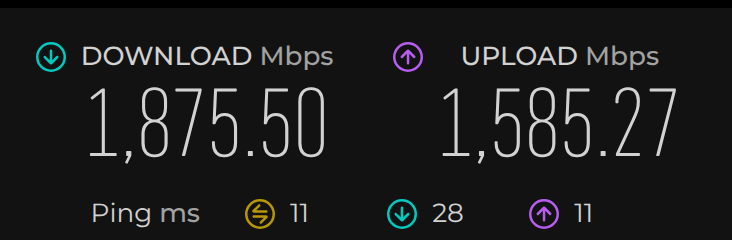
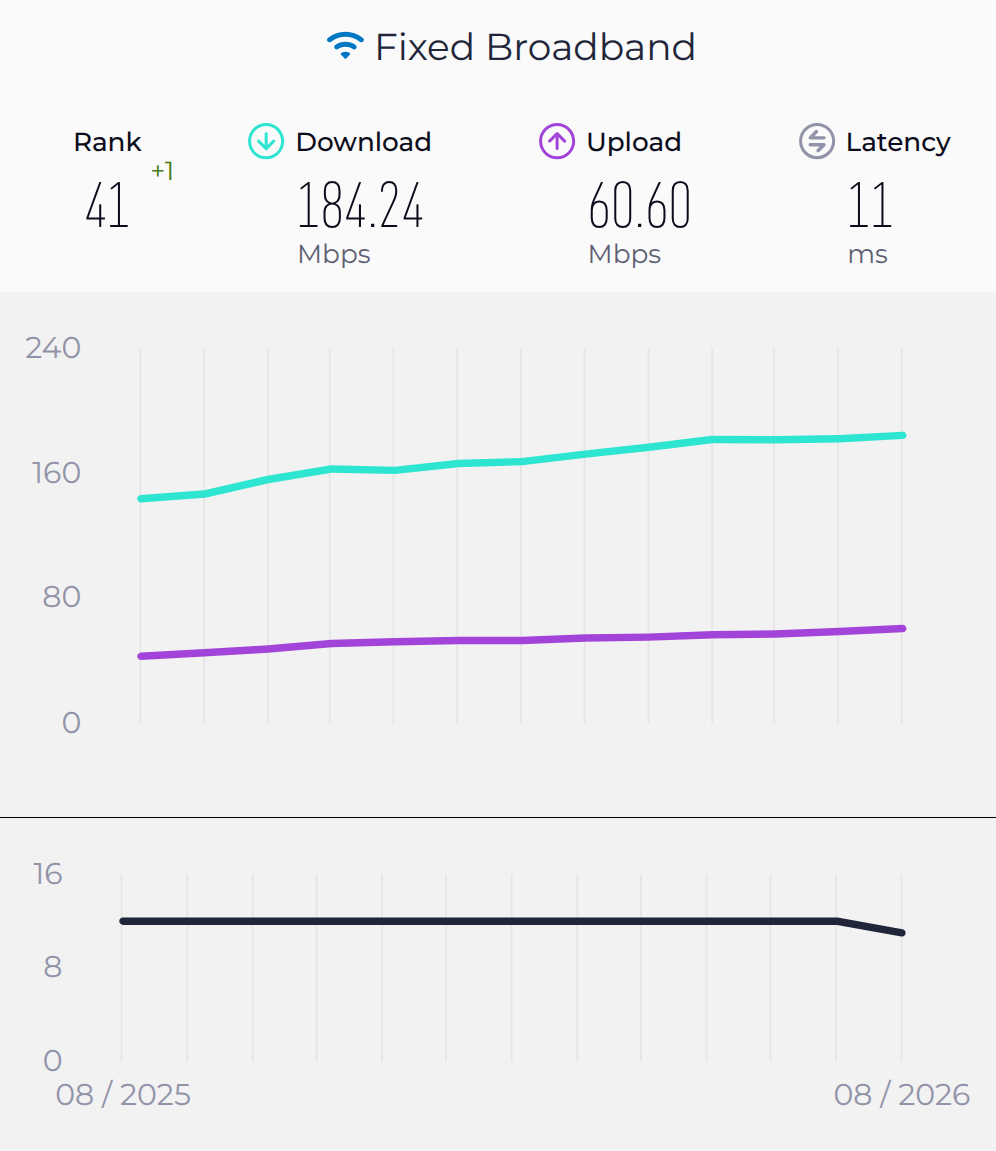
To put this into context, Ookla, the global leader in bandwidth monitoring report the UK average download speed as 184Mbps for fixed connections in August 2026. I think 10x the average via a VPN is hard to define as “slow”.
The downside from my perspective with this setup is that each VPN connection requires an LXC, I could have more than one per lxc but that’s way too much hassle to setup. So i took some time to start developing a drop-in VPN gateway service that can run on inexpensive hardware or a spare machine which many of us have lying around. Progress has been good and whilst there is more to do, I anticipate making this available open source shortly.
Note: Many of us now have routers which will connect to a VPN provider, but this can be inflexible – some older routers will expect every device connected to that router to route its traffic via the VPN. We don’t always want that, in fact, sometimes it can be downright problematic. Anecdotally, I recall making a large transfer from my bank account only to be called by the Fraud team because my phone was routed via the VPN so they wanted to check it was me.
This service is intended to be an addition to the network, not a replacement for existing infrastructure.
VPN Open Gateway
The idea was to create a single service which allowed WireGuard (Open VPN and others may be included in due course) configuration files supplied by a VPN provider to be loaded, connected, monitored and used as simply as possible.
It runs a lightweight Debian install as a VM with absurdly low resource requirements:
- 1Gb RAM
- 8Gb HDD space.
- 2 cores of an ageing Proxmox host.
Much of the work has been behind the scenes, creating the scripts necessary to allow config files to be imported and revised to deliver fast, reliable, monitored connectivity having regard for possible failure modes and race conditions.
But this kind of thing should be simple, not just for people who aren’t familiar with how it all works but because these things should be simple, not an industry into themselves.
As it stands, this is several weeks away from being fully tested and revised – all the functionality I wanted, excluding non-WireGuard protocols, is largely there and working flawlessly so far. Below are some samples of the web interface as it stands. Users should never have to interact with this platform via the command line.
Connection
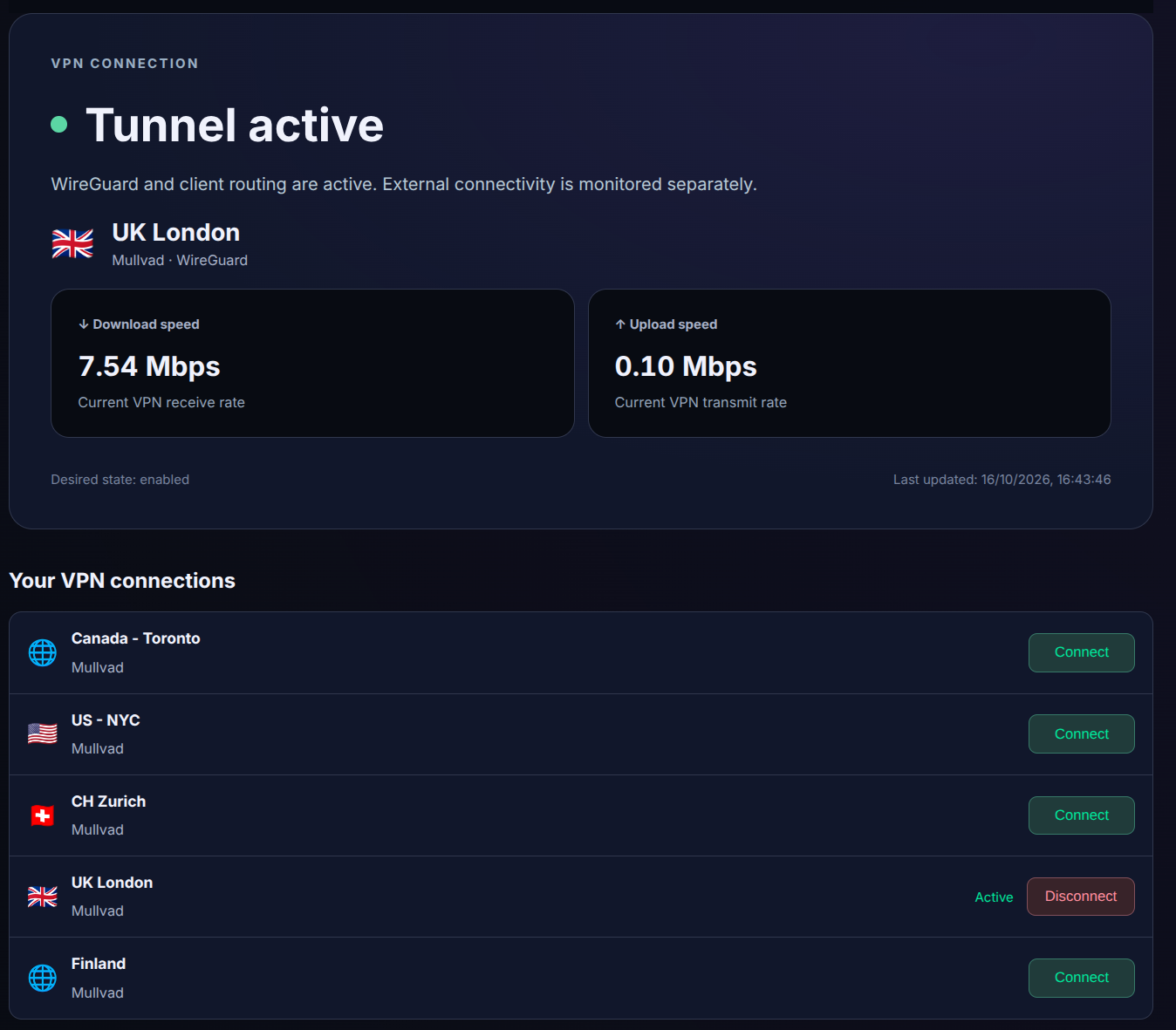
This section provides high level “near to real time” statistics on throughput, showing the connection currently in use and allowing users to select the VPN server they want to use.
Noted: Flags not picking up for every country.
Traffic Statistics
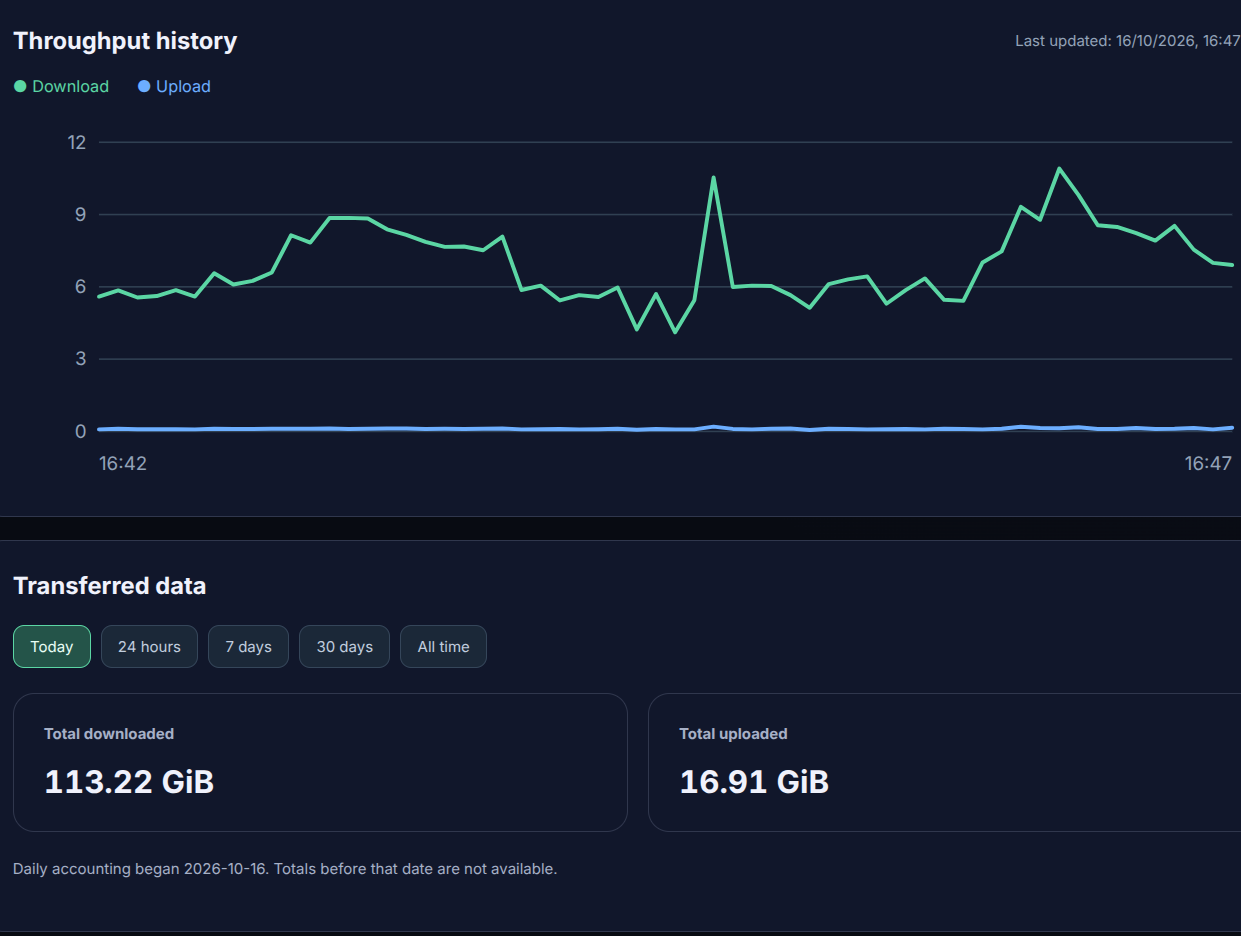
Near to real time chart showing throughput and basic data showing how much data has flowed over different time periods.
Monitoring
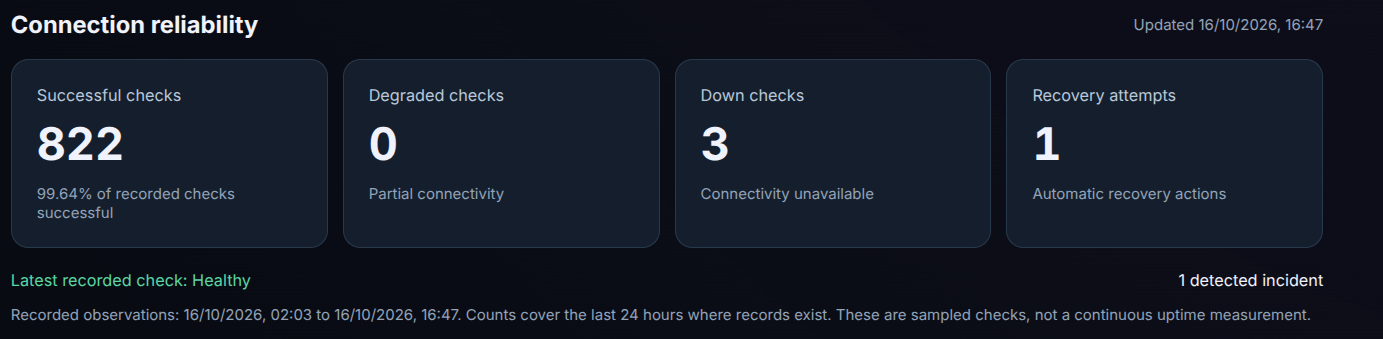
WireGuard will typically reconnect seamlessly if it temporarily loses connectivity with a VPN provider, but as belt and braces we continuously run monitoring and recovery processes, the data above shows we had 3 instances out of 822 where one or more of the checks indicated connectivity had been lost and one attempt that required recovery by the system. These were intentional, as part of the testing process rather than actual failures.
Server Import
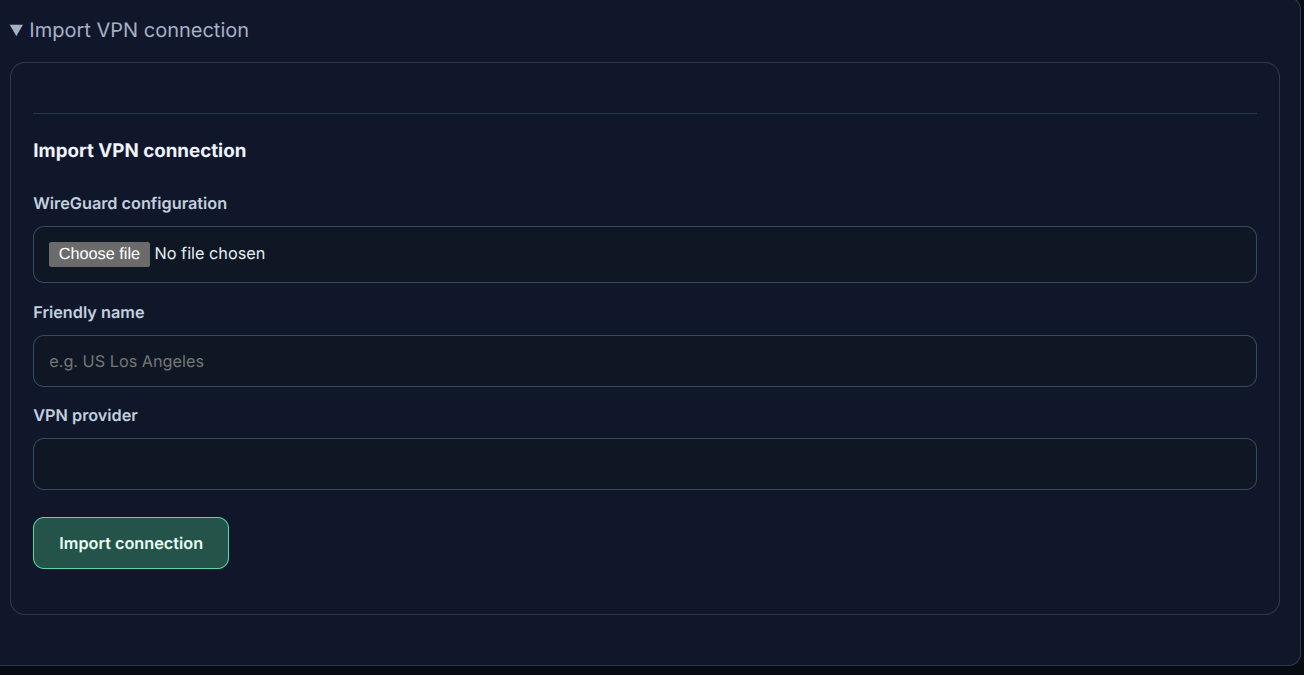
Allows users to import .conf files supplied by the VPN provider. The system will then make the connection available in the Connections list.
Note: We need a method to delete connections, this is on the list!
Next Steps
I intend to test this over the next several weeks and make iterative improvements based on my own experience. Identifying any bugs, new features and tweaking the interface. At which point, this will be packaged with a suitable installer and guidance for anyone who might find it helpful.
If anyone is interested in giving this a test, please feel free to drop me a line at vpnopengateway@m9veb.com.
Leave a Reply